
The most useful event technology trends UK planners should watch in 2026 are the ones that improve decisions before the event, sharpen the attendee journey, and make delivery easier to measure.
Use this shortlist to compare tools against real planning needs, from staffing and sourcing to networking, accessibility, and content reuse.
It also helps you check where Naboo fits into the process, especially when you want clearer sourcing, management, and tracking across the event journey.
Key takeaways
- AI-powered predictive planning tools help planners forecast staffing, catering, and sourcing needs using past attendance patterns, travel disruption, weather, venue size, and operational data, which is useful when rail strikes or seasonal weather could change attendance at short notice.
- Hyper-personalised attendee journeys and intelligent networking matchmaking make the experience more relevant by matching schedules, content paths, and meetings to each guest's role, interests, stated goals, profile data, and app behaviour.
- Integrated event sustainability measurement gives teams real-time evidence on waste diversion, energy use, travel emissions, and catering impact, so transport and materials choices can be made with the footprint in view.
- Immersive extended reality environments, digital twin venue mapping, and remote speaker and panel integration support hybrid delivery by improving wayfinding, venue inspection, room setup testing, and low-delay participation from remote contributors.
- Live language translation and captioning services, seamless wearable technology integration, and blockchain for secure ticketing and access all focus on smoother entry, clearer communication, and better control over who gets in and how people move through the venue.
1. Ai-powered predictive planning tools
AI-powered predictive planning tools help organisers make better decisions before the event starts.
They analyse past attendance patterns, travel disruption, weather, venue size, and operational data to forecast staffing, catering, and sourcing needs. For UK teams, that matters when rail strikes, regional travel, or seasonal weather can change attendance at short notice. The result is less waste, fewer surprises, and a tighter plan from the first venue shortlist to the final headcount.
Group setup: the planning team
Best for: forecasting staffing, catering, and sourcing needs
How to apply: Use past attendance patterns, travel disruption, weather, venue size, and operational data as inputs. Check the forecast before you confirm staffing, catering, and sourcing. Revisit it when rail strikes, regional travel, or seasonal weather could change attendance at short notice.
2. Hyper-personalised attendee journeys
Hyper-personalised attendee journeys give each guest a schedule and content path that fits their role and interests.
Event management software can suggest sessions, surface relevant updates, and point people towards the right people or activities. That makes the experience feel more useful and less generic. In practice, it helps delegates spend time on what matters to them, rather than working through a one-size-fits-all agenda that leaves half the room underused.
Group setup: the whole event audience
Best for: making schedules and content paths feel relevant
How to apply: Set up the software to suggest sessions, surface relevant updates, and point people towards the right people or activities. Match each guest's schedule and content path to their role and interests. Keep the agenda focused on what matters to them, not a one-size-fits-all flow.
3. Intelligent networking matchmaking
Intelligent networking matchmaking replaces random introductions with more useful connections.
AI tools can use stated goals, profile data, and app behaviour to suggest who should meet whom, whether the aim is finding buyers, partners, or peers in a specific sector. For organisers, that means networking becomes easier to shape and easier to measure. For attendees, it means fewer dead-end conversations and more meetings that feel worth the time.
Group setup: the whole event audience
Best for: finding buyers, partners, or peers in a specific sector
How to apply: Feed the tool with stated goals, profile data, and app behaviour. Use its suggestions to shape who meets whom. Keep the focus on meetings that are worth the time for attendees and easier to measure for organisers.
4. Integrated event sustainability measurement
Integrated event sustainability measurement brings environmental reporting into the event itself.
Platforms can track waste diversion, energy use, travel emissions, and catering impact in real time, giving organisers evidence rather than assumptions. That is especially useful for UK companies under pressure to show responsible delivery. It also helps teams make better choices while planning, from transport options to materials, instead of trying to reconstruct the footprint after the event has finished.
Group setup: the whole planning team
Best for: showing responsible delivery
How to apply: Track waste diversion, energy use, travel emissions, and catering impact in real time. Use the evidence while planning, not after the event has finished. Make choices on transport options and materials with the footprint in view.
5. Immersive extended reality environments
Immersive extended reality environments use VR and AR to make sessions more interactive and more memorable.
AR can support wayfinding, product demos, and live overlays, while VR can create a digital version of a venue for remote participants. For hybrid events, that creates a stronger sense of shared space. It is also useful when a team wants to explain something complex without relying on slides alone, especially for product launches or technical training.
Group setup: hybrid events
Best for: product launches or technical training
How to apply: Use AR for wayfinding, product demos, and live overlays. Use VR to create a digital version of a venue for remote participants. Keep the session focused on explaining something complex without relying on slides alone.
6. Digital twin venue mapping
Digital twin venue mapping lets planners inspect a venue without being on site every time.
A 3D model can show room layouts, seating options, accessibility routes, and A/V placement, which is useful when comparing properties across London, Leeds, Birmingham, or beyond. It shortens the sourcing process and reduces guesswork. Teams can test different setups before committing, which is especially helpful when the event depends on precise flow or a particular room configuration.
Group setup: the venue sourcing team
Best for: comparing properties and testing room setups
How to apply: Use a 3D model to inspect room layouts, seating options, accessibility routes, and A/V placement. Compare properties across London, Leeds, Birmingham, or beyond without being on site every time. Test different setups before you commit.
7. Advanced behavioural gamification platforms
Advanced behavioural gamification platforms turn participation into something people can see and respond to.
Instead of basic points, they reward actions linked to event goals, such as visiting sponsor areas, completing quizzes, or joining group challenges. That can lift engagement because the activity is tied to the programme, not added as decoration. Used well, gamification gives attendees a reason to move, learn, and interact, while giving organisers a clearer picture of what people actually did.
Group setup: the whole event audience
Best for: lifting engagement through programme-linked activity
How to apply: Reward actions linked to event goals, such as visiting sponsor areas, completing quizzes, or joining group challenges. Keep the activity tied to the programme, not added as decoration. Use the results to see what people actually did.
8. Real-time sentiment analysis and feedback loops
Real-time sentiment analysis and feedback loops help organisers understand how an event is landing while it is still happening.
Tools can read chat activity, app interactions, and social mentions to show where energy is high or where a session is losing attention. That allows quick changes, such as adjusting the pace, adding support, or redirecting people away from congestion. It is a practical way to respond in the moment instead of waiting for a survey after everyone has gone home.
Group setup: the whole event audience
Best for: reading live reactions and adjusting quickly
How to apply: Read chat activity, app interactions, and social mentions as the event happens. Watch for where energy is high or where a session is losing attention. Make quick changes such as adjusting the pace, adding support, or redirecting people away from congestion.
9. Seamless wearable technology integration
Seamless wearable technology integration makes access and movement easier across the venue. Smart badges using NFC or Bluetooth can support registration, secure entry, and lead capture, while also helping organisers understand how people move through the space.
That data can reveal pinch points and busy zones, which is useful for floor planning and crowd flow. For delegates, the benefit is simple: fewer queues, fewer manual checks, and a faster start to the day.
Group setup: the whole venue flow
Best for: registration, secure entry, and crowd flow
How to apply: Use smart badges with NFC or Bluetooth for registration, secure entry, and lead capture. Track how people move through the space to spot pinch points and busy zones. Use what you learn to adjust floor planning and crowd flow. Keep the delegate journey focused on fewer queues and fewer manual checks.
10. Blockchain for secure ticketing and access
Blockchain for secure ticketing and access is being used to strengthen identity checks and reduce fraud. It creates records that are harder to alter, which helps with ticket issuance and verification.
For event teams, that means cleaner entry processes and better protection for attendee data. It is not about adding complexity for its own sake. It is about making sure the right people get in, while keeping registration and access control more reliable.
Group setup: the whole team at once
Best for: ticket issuance, verification, and access control
How to apply: Use blockchain to create records that are harder to alter. Apply it to ticket issuance and verification so identity checks are stronger and fraud is reduced. Keep the process focused on cleaner entry and better protection for attendee data. Use it to make sure the right people get in.
11. Live language translation and captioning services
Live language translation and captioning services make events more accessible to international and hearing-impaired audiences. AI-driven translation can feed directly into headsets or event apps, while real-time captions support both spoken and visual content.
That matters for UK events with global teams, mixed-language audiences, or hybrid attendance. It also helps speakers reach more people without changing the structure of the session, which keeps the experience inclusive without slowing it down.
Group setup: the whole audience at once
Best for: international, mixed-language, or hybrid attendance
How to apply: Feed AI-driven translation into headsets or event apps. Add real-time captions for both spoken and visual content. Use the service for UK events with global teams, mixed-language audiences, or hybrid attendance. Keep the session structure as it is so speakers can reach more people without slowing it down.
12. Automated content summarisation tools
Automated content summarisation tools turn sessions into usable content quickly. AI can process keynote recordings and panel discussions, then produce summaries, key points, and short highlight clips soon after the session ends.
That extends the life of the event beyond the day itself. It also gives internal teams something they can share with colleagues who could not attend, which makes the content more valuable and easier to reuse across channels.
Group setup: the whole content team at once
Best for: session recaps and reuse across channels
How to apply: Process keynote recordings and panel discussions with AI after the session ends. Turn them into summaries, key points, and short highlight clips. Share the output with internal teams and colleagues who could not attend. Use it to extend the life of the event beyond the day itself.
13. Remote speaker and panel integration
Remote speaker and panel integration keeps hybrid events feeling coherent when some contributors are not in the room. Studio setups and event software can let virtual speakers take part in live Q&A, control slides, and speak with low delay.
That matters when the audience expects a polished experience, not a clumsy video call bolted onto a live stage. Done well, it keeps the conversation moving and gives remote contributors a proper role in the programme.
Group setup: hybrid stage and remote contributors
Best for: hybrid events with remote speakers or panellists
How to apply: Set up studio equipment and event software so virtual speakers can join live Q&A, control slides, and speak with low delay. Keep the remote contribution part of the programme, not an add-on. Make sure the audience gets a polished experience. Keep the conversation moving so remote contributors have a proper role.
14. Decentralised micro-event streaming solutions
Decentralised micro-event streaming solutions support smaller, more focused gatherings that still need a wider reach. They let intimate events share content globally through reliable high-definition streaming without the scale of a large conference setup.
That is useful for niche communities, specialist briefings, and private buyouts where the audience is small but the message still matters. It gives organisers a way to extend the event without turning it into something bigger than it needs to be.
Group setup: small, focused gatherings
Best for: niche communities, specialist briefings, and private buyouts
How to apply: Use reliable high-definition streaming to share content globally from a smaller event. Keep the setup lighter than a large conference build. Use it when the audience is small but the message still matters. Extend the event without making it bigger than it needs to be.
15. Wellness and focus-oriented app features
Wellness and focus-oriented app features recognise that long event days can be draining. Apps are starting to include guided meditation, hydration reminders, screen-break prompts, and maps of quiet zones within the venue.
These features support concentration and comfort, especially during dense conference schedules. For planners, they are a small but useful signal that attendee wellbeing matters. For guests, they help the day feel more manageable and less relentless.
Group setup: the whole audience at once
Best for: long event days and dense conference schedules
How to apply: Build guided meditation, hydration reminders, screen-break prompts, and quiet-zone maps into the app. Use them during long event days and dense conference schedules. Keep the features easy to find so guests can use them when they need a pause. Use them to support concentration and comfort.
How do you avoid common mistakes when adopting event technology?
The biggest mistake is adding too many tools and making the experience harder to use. If attendees need separate apps for registration, networking, Q&A, and gamification, the event starts to feel fragmented. A better approach is to consolidate the core functions into one platform and remove anything that does not support the event's main goals. Another common issue is ignoring user ability. Test with non-technical users, and make sure support is easy to find onsite.
As Maxime Eduardo, CEO at Naboo, puts it:
"That is why our model pairs powerful automation with a white-glove service layer. We are not trying to remove the human factor. We are using technology to elevate it. I think that is a very important distinction."
A third mistake is failing to connect the data after the event. The value of modern event tech sits in the information it produces, from engagement patterns to networking outcomes. If that data stays trapped in separate systems, it loses value quickly. Teams should plan for CRM and marketing integration from the start so the insights can be used straight away.
How do you measure whether event technology worked?
Success should be measured across engagement, efficiency, and ethical alignment rather than attendance alone. Engagement can be tracked through networking adoption, content downloads, and time spent in interactive areas. Efficiency can be measured through time saved in planning, lower printing use, and better catering accuracy. Ethical alignment can be tracked through accessibility coverage, carbon reduction against a baseline, and participation in CSR activities. Together, these measures show whether the technology improved the event in ways that matter.
How do you choose the right mix of tools for a UK event?
The right mix depends on whether your biggest need is automation, immersion, or ethics. If the pressure is operational, start with predictive planning and data integration. If the goal is stronger participation, focus on personalisation, matchmaking, gamification, and immersive formats. If the priority is responsibility and access, choose sustainability tracking, translation, captioning, and secure access tools. The best choice is usually the one that solves the most visible problem first, without adding unnecessary complexity.
Where to host event technology trends UK
The venue decides which event technology trends will work in the UK, from hybrid setups to data-led check-in. Each type below is paired with a real Naboo venue, so planners can match the idea to a space that fits.
A hotel with meeting rooms
A hotel with meeting rooms suits ideas like AI-powered predictive planning tools and live language translation and captioning services because it already brings planners, speakers, and delegates into one controlled setting. That makes it easier to shape schedules, route people through sessions, and keep feedback, content, and networking data connected as the event unfolds.
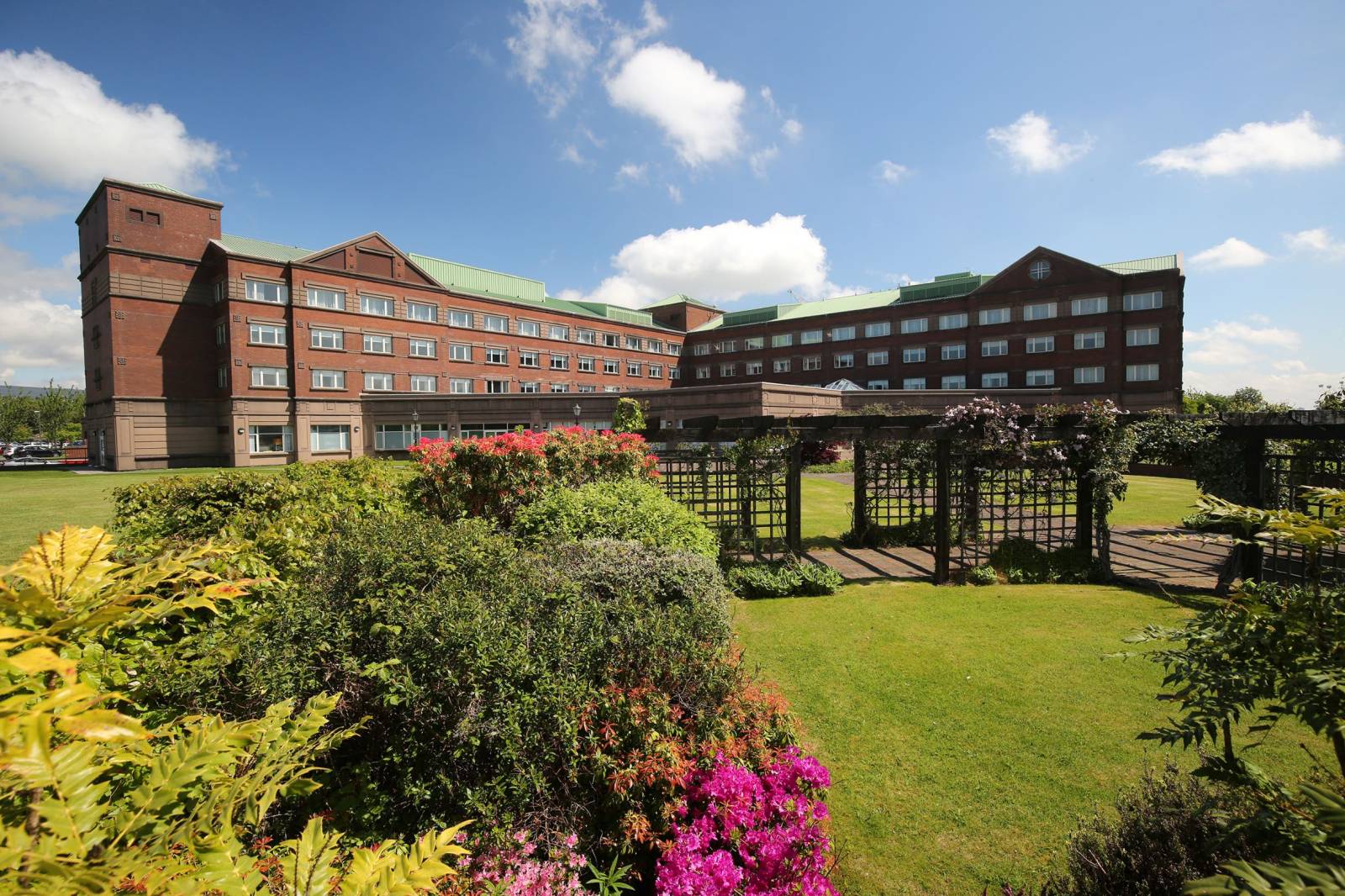
Golden Jubilee Conference Hotel is a four-star venue in Glasgow, Scotland, set on the banks of the River Clyde. It has 170 guest rooms and 16 meeting rooms, and it is used for conferences, training sessions, and meetings.
Frequently asked questions
What is the most significant technological shift impacting events in 2026?
The biggest shift is the move towards AI-driven personalisation. It now shapes content agendas, networking recommendations, and predictive logistics, which changes both the attendee experience and the organiser's workload.
How do I choose the right event technology for a UK event?
Choose tools that cut manual work, improve attendee experience, and make sustainability measurable. The strongest trends sit across automation, immersion, and ethics, with AI, XR, accessibility, and data security leading the way.
How do I run event technology well on the day?
Use technology to reduce friction without adding extra apps or steps. Real-time tools can help you adjust the pace, add support, redirect people away from congestion, and keep the delegate journey focused on fewer queues and fewer manual checks.
What group size should event technology be built for?
It depends on the use case, but the text points to the whole event audience, the whole planning team, the venue sourcing team, and hybrid events. Match the tool to the group it serves, whether that is forecasting staffing, shaping networking, or improving venue flow.
How do I make event technology work for remote or hybrid teams?
Use live translation, captioning, and content capture for mixed-language or hybrid attendance. VR can create a digital version of a venue for remote participants, while AR can support wayfinding, product demos, and live overlays.
Which trends help with sourcing and venue planning?
AI-powered predictive planning tools help forecast staffing, catering, and sourcing needs using past attendance patterns, travel disruption, weather, venue size, and operational data. Digital twin venue mapping also helps by showing room layouts, seating options, accessibility routes, and A/V placement before you commit.